Tampilkan postingan dengan label Technology. Tampilkan semua postingan

Rabu, 07 Maret 2012

iPad 3? No, it's the New iPad.

A simple meme comic I made regarding the New iPad name.

After many, many rumours of a new iPad for months after the release of iPad2, Apple has released their new iPad and named it, well, "The New iPad".

The internet has been abuzzed with rumoured names like:
1) iPad 3 - a direct sequel to iPad 2.
2) iPad 2S - following the naming sequence of the iPhone 3G-3GS and iPhone 4-4S.
3) iPad HD - following rumours of a Retina Display screen.

Apple officially unveiled their new iPad and just called it that, The New iPad, showing everyone time and time again that Apple rumours are what they are, rumours. This new iPad is essentially the iPad 3rd generation, going by the same naming convention as their iPod, iPod Nano and iPod Touch lines. It'll probably just be released as iPad, further adding to the confusion.


With that out of the way, here's just a quick summary of what the new iPad is all about:

1) 9.7" Retina Display (3.1million pixels, 2048x1536 resolution)
2) 5 MP BSI camera
3) Dual Core A5X processor w/ quad core CPU
4) 3G/4G LTE antenna
5) 652g (heavier than iPad 2)
6) 9.4mm thick (thicker than iPad 2)
7) iOS 5.1
8) 10 hr battery life (claimed by Apple)
9) 16/32 GB storage (non-expandable)

And that's about it. If you're wondering, what's so special or ground breaking about this new tablet, the answer is nothing, or unless you want to count the Retina Display. It has a nice screen, good colours though artificially saturated by the GPU, high resolution display. It is a worthy upgrade from the original iPad but it hardly warrants the upgrade from the iPad 2.


With Apple setting the benchmark (whether good or bad, you decide), the competition will find ways to try to best it. Android tablets are coming out strong, with some tablets already better than the new iPad specification-wise. In terms of performance, Android is not as smooth or may not have the same eye-candy as iOS, but apps on Android are more stable and crash less often according to a recent study. Furthermore, Windows 8 tablets are just about to show themselves later this year and are already looking pretty good themselves, as can be seen in the demo below. Also Windows 8 has the advantage of being able to run in both a tablet mode and a desktop mode on the tablet, thereby allowing more flexibility and possibly heralding the true tablet PC though this still remains to be seen.

In the end, tablets are still a new commodity and their future is still yet unpredictable. It will still be as exciting to see how they will turn out to be a year later as it is now, 2 years after Apple released the first iPad.

Sabtu, 13 November 2010

Watch your head... And hands... And legs as you enter the ETAF Automatic Door (Video)

Doors can be as simple as a piece of wood and a handle or as complex as the ETAF Automatic Door. This door consist of 35 rows of 5cm metal bars that are split down the middle. No matter what size you are, the ETAF Automatic Door will always fit.

The ETAF Automatic Door has infrared sensors just before the door, which measures the size of the person and/or object that wants to pass through, make some calculations and slides the corresponding bars wide enough for that person to pass through.

While this door certainly makes you feel like you're entering a spaceship, it also means you have to stand still for a second for the sensors to register your body, calculate and open the door for you. On top of that, you have to make sure you have more or less the same body profile as you pass through the door as the sensors do not update continuously. Regardless, this is a pretty cool door design.


Article Source: Trendhunter

Sabtu, 06 November 2010

Creative Releases Their Creative Ziio Tablets

Ever since the Apple iPad went on sale and created a new market, big and small companies alike have tried to bring their own version of the tablet computer into it. Ranging from S Korea's Samsung and their Galaxy Tab and LG Electronics with their Optimus Tablet to Taiwan's ASUS and their EeePad to Canada's Research In Motion and their BlackBerry PlayBook and many many more. And now the latest to join in the tablet market is Creative from Singapore and their range of Ziio Tablets.


**Skip 2 paragraphs down if you want to read about the tablets only  =) **

Creative, internationally known for their X-Fi audio technology, has been quietly releasing some products recently such as their range of wireless speakers. Anyway, I support our local electronics company. I've owned their Zen, Zen X-Fi mp3 players, X-Fi 5.1 external soundcard, 5.1 speakers, an Aurvana earphones and Vado HD 2nd Gen pocket cam. So far, I find that their X-Fi audio technology still beats everything out there, the mp3 players put out better sounds than any other mp3 players, even the widely-popular iPod. A quick search will show you that many people think the same way. Also, their Vado HD pocket cam, is small, powerful and wins over the competing brands. Its recording quality, while more or less the same now as when it was released in 2008, still beats the "advanced" iPhone 4 HD video-recordings. I was generally happy with Creative products for their balance of price, build quality and functions and am always excited to look out for their new products.

However, on the gadget-front, this company hasn't been doing too well recently. I liked their mp3 players simply cause of the good audio and also cause they're still making button-operated ones, which is important to me since I tend to interact with my mp3 players in my pocket or without having to look at it. Then came along their Zen X-Fi 2, their first mp3 player to be fully touchscreen and trying to follow in the footsteps of the successful iPod Touch. While the audio is still great, the user interface is not responsive and a pain to use. That disappointed me. Creative has just tried to step into the touchscreen gadgets arena and failed.

Creative Ziio Tablets in 7in and 10in forms

Alright, back to the tablets, which is the main point of this post. Lol. So just last week, Creative UK has announced the new Ziio tablets. These came in the white 7in and the black 10in versions. These tablets are powered by Andriod 2.1 but are currently only wifi enabled, which means no access to the Andriod Market. Unless these devices are upgraded to Andriod 2.2, it's a feature that won't be seen on Ziio.

Besides the size, both version on Ziio have common features:
1) Creative own ZiiLABS processor
2) Both available in 8GB or 16GB versions
3) 1 front-facing VGA camera and mic for video calling
4) Resistive touchscreen (no multi-touch), with embedded stylus
5) X-Fi technology
6) Built-in speaker
7) Accelerometer
8) WiFi-enabled
9) Accessible to Creative ZiiStore for apps and games
10) Expandable memory via microSD cards
11) HDMI-out for displaying HD videos on TVs

While many are quick to say that resistive touchscreens do not offer multitouch, as opposed to capacitive ones like those used on smartphones nowadays, I personally think that multitouch is not a necessary feature.  If you had used a touchscreen phone before the age of multitouch, you would have known that. You do not need multitouch to swipe a page left or right, to type on the keyboard or zoom in or out. What matters is proper implementation of the user interface. The only reason for multitouch is for the games, which the Ziio is clearly not intended for.

I would like to have a feel of the Ziio when it reaches Singapore, but as of now, I'll just have to contend with the following 2 videos. From what I can see, HD video playback is very smooth, even when it is connected to the TV. The host even had a go at Angry Birds on the Ziio and performance was surprisingly good. I say that because of the flop Creative had with touchscreen on the Zen X-Fi 2. However, the interface is quite laggy when navigating through the apps, but that's sluggishness is due to the Andriod 2.1 and not cause of the processor. I do hope that it will upgrade to 2.2 soon and clear that up.

The Ziio is by no means an iPad-killer, but it will satisfy the needs of people who wants a cheap and yet powerful AV (audio-video) device without all the fuss of multitouch or apps or games. A device that's purely for consuming content. I, for one, am one of those people who are looking out for just such a device that allows me to watch videos, surf the net and read view PDFs comfortably. And I'm glad that Creative is the one doing it. By the way, the Ziio is mostly made of plastic, so it's also very much lighter and comfortable to hold in the hands for extended periods of time.

At a starting price of only SG$359 for the most basic Ziio, it's already half as cheap as the cheapest Apple's iPad which goes by about SG$650, without contract, and much more affordable. It even provides features that the iPad doesn't have such as the front-facing camera and a much more common mini-USB connection port. This is yet another Creative device that I'm looking at. I hope they don't disappoint me again.

Update (7/11/10): I just realised that the 7in version is natively portrait and also looks very similar to the Samsung Galaxy S. However, the 10in is natively landscape; its buttons are position along the longer side of the tablet. The 7in outputs video in 720p while the 10in outputs in 1080p.


Source: Creative SG

Senin, 11 Oktober 2010

Megapost: Windows Phone 7 Makes A Hot Debut! (Lots of Photos) [Updated 10:15am SGT, Lots of videos too]

After building lots of anticipation of Windows Phone 7, Microsoft has finally debuted their new WP7 OS and phones on Oct 11, 2010. There have been images and videos of phones bearing the WP7 OS since the official announcement of it earlier in Feb this year. Not to be confused with Windows Mobile OS, Window Phone 7 is set to take on the smartphone world.


Windows Phone 7
Microsoft may have been leading the smartphone OS many years ago with Windows Mobile. However, the new generation of smartphone OS which are touch-operated, heralded by Apple's iPhone has slowly pushed Microsoft out of the picture. Even though Microsoft has upgraded the WinMo platform to a more finger-friendly 6.5, the Redmond company just couldn't catch up with Apple's iOS and the fast rising Google's Andriod. Not wanting to give up, Microsoft announced in early 2010 that they are developing Windows Phone 7, leaving many wondering if they can really pull it off. Many leaks and teases were dropped in the period leading to the official debut on Oct 11, 2010. Impressions have been really good and praises were given for the slick and fresh minimalistic user interface, the silky smooth animations and deep integration with Microsoft Office, Hotmail and XBox-Live. However, limited information was made know and many questions about this amazing new OS were left unanswered, until tonight.

By the way, the images I used below are all captured and edited on my own while watching the keynote live via streaming off Microsoft's website. The stream is of a variable quality, so some of the images were captured during hi-quality broadcast and others during the low-quality, thus some of the images are sharper and some are fuzzier, pardon that. =)

The windows phone 7 homescreen, scrolled from top to bottom, picture left to right.

So right off the top, Microsoft CEO Steve Ballmer formally introduced the Windows Phone 7 platform to the world. Microsoft has already signed deals with many top phone companies, such as HTC, Samsung, LG, Dell, Asus and others, to bring WP7 to you. During his keynote, he has unveiled 9 WP7 devices that will be available to consumers soon. Microsoft has also gathered telcos around the world to exclusively sell WP7 phones when they are available. If you look closely at the list the Microsoft has shown, you can clearly spot SingTel. =)


Above: The 9 windows phone 7 devices that will be on sale soon
Below: A list of companies that are collaborating with Microsoft to bring WP7 to you. SingTel is among them.

So a quick tour of the Windows Phone 7 experience, or based on what I can remember. It's been about 2 hours since I watched the keynote and I can forget things quite easily, so bear with me. Haha.

2 pictures above depicts the WP7 homescreen. Each square is called a "Live Tile" where information for that tile, if any, is constantly updated and reflected there. Unlike other phones out there, almost anything can be put on the homescreen, such as SMS notifications, Emails, individual contact card, a facebook feed widget, photo slideshow, weather display, apps and almost everything imaginable. The colour of the tiles, or rather the colour theme can be changed as you can roughly see in the 9 phones picture above. Unfortunately the background have to remain black, but that's only for the homescreen as you will see soon enough.

A repeating theme that you will see with all the apps are that to view a different screen, the user will have to simply flick the screen left or right, instead of pressing any physical or soft buttons.


People Hub
A contact card, flicking the screen left and right reveals different information about the contact.
Windows Phone 7 has a different way with dealing with contacts. Instead of just an app showing contact information, Microsoft has made it into a hub where you can view all sorts of information related to that contact. Being called People Hub, it is a place where you can find anything you want with your friends. 

When you launch the People hub, it starts simple, showing a whole long list of contacts arranged by alphabets and with their corresponding profile pictures. Selecting any contact will take you, with a nice transition animation of course, to the contact card where you can find all the personal information such as phone number, email, address, website and any other information you have stored. For each contact, you are given the option to link the contact to any social network available, such as Facebook and Twitter. Doing so will allow you to flick the contact card screen to slide it to the left, which will reveal the What's New screen where all the status updates and tweets for that current contact. Pretty amazing. And what's more, the phone will automatically take the profile picture from either Facebook or Twitter and use it for the contact card image. Very useful!


Music+Videos Hub
Music + Videos hub, where you can listen to music and view videos
Next is the Music+Videos hub. In here, you can use Microsoft's popular Zune player to play music, much like Apple's iPod player. As expected, you can browse the music according to songs, artists, albums and playlists. In addition, you can also view videos in this hub. Video apps like YouTube are able to integrate here so that all the video needs are presented simply in this one hub. The hub will feature a "music and video history" list that will show you what you have recently played and allows you to view them again at a touch, without having to go through all the menus. If you subscribed to video or audio feeds through the integrated apps like YouTube, there's even a screen where some new and recommended videos are listed.


Microsoft Office 2010
Microsoft Office integration and Pictures hub
WP7 also offers really deep integration with their new Microsoft Office 2010. The phone allows you to take quick notes with OneNote, which is the homescreen for the Office hub. All the other programs such as Word, Excel and Powerpoint are also in the Office hub, which allows you to view and edit the documents on the go. You can choose to save the documents on the phone or in the Microsoft cloud so that you can access the document on any computer through the internet without having to plug the phone in and transfer. It's much handier that way. Also, a bonus feature is that you can run Powerpoint slideshow directly on the phone with all the transitions. Yup, that's not made up, it was demo-ed there live with a WP7. And with the correct cable, you can even connect to a projector and set up a slideshow, all from the phone. Say goodbye to lugging a laptop the next time you have a business presentation to do. Just whip out the phone, connect to a projector and you're all set!


Pictures Hub
Next is the Pictures hub or basically a photo-viewing app, but with a difference. What set this apart from other phones is that you can link the Pictures hub to a Facebook account or other photo-sharing websites. So besides just viewing photos on your phone, swipe the screen to the side and you're presented with photo feeds from Facebook. That's all too convenient. Anytime you want to view your own photos and/or Facebook photos, just need to start up the Pictures hub and everything will be there. No more do you have to open both the photo and Facebook apps separately. You can also upload the photos to Facebook through the Photo hub. Simply put, anything you want to do with photos, you can do it in the photo hub, though I'm not too sure about photo-editing just yet.


Camera
Ok, the next, which I don't have any photo of, is the camera function. The camera quality and megapixel count will differ from phone to phone, but all will use the same camera app. The camera is similar to all other phones and offers touch-to-focus. You can switch the camera on by pressing the shutter button on the side of the phone or launching the camera app. Start up time is impressive at about 2-3 secs from app-launch to photo-taking ready. When the photo is taken, the snapshot slides to the left and out of the screen while the camera is ready for another shot, similar to an iPhone camera, except that the iPhone camera has a pretty jarring bar at the bottom of the screen to display previous snaps and that takes up precious screen space that you will need to use to help frame the next shot that you want to take.

If you want to view the previously taken photos, all you have to do is just swipe the screen to the right and the photos on the camera roll will slide in and you can see all the photos taken thus far, not just the ones taken in this session. You can also choose the display style as just plain or with a film-strip look. A small but visually appealing move.

From the video below, you can see that the camera app allows you to make very detailed adjust to suit your photography needs. All settings like ISO, Shutter Speed, Exposure, Metering, Resolution, HDR, WDR, Panorama, Scene Modes and many other adjustments can be made directly in the app.


Email Hub
The email app and calendar (black screen)
One must-have app for business users out there is the email app. Simple and easy to use, you know how it is, flick the screen left and right to view message categorised in different ways. The email app is easy to set up with Hotmail and uses all their features. Furthermore, the email app can sense appointment timings and other events and automatically update it to the calendar app if you instruct it to. Quick and convenient with no fuss. To add even more intelligence, the phone will let you know if the new appointment clashes with any other booking for that same time slot. As you can see in the screenshot above, the black screen is the calendar app. The left column shows the booked time slots and the right shows the new appointment that clashes with the current bookings.


Maps App
The Maps app, zooming out shows the map, zooming in enough shows the satellite view.
The Maps app in WP7 is exactly what you will expect. You can view maps and search by locations. The WP7 will function like a GPS and direct you to the destination turn by turn. As a bonus touch, when you're zoomed out, you will see the map and directory, however, zooming in close enough will change your view to a satellite view with the road names overlaid on it. Nothing much to say besides that.


WP7 Apps
Some of the apps on demo. From left, U-Verse AT&T, IMDB and eBay.
All of them sport the same user interface to maintain familiarity and intuitiveness.
Of course, any phone nowadays count on the apps to enhance the experience and WP7 is no different. With about 2000 apps developed already, there's a new world waiting when the first WP7 hit the stores. While 2000 may seem like a small number compared to the 250,000 on Apple's AppStore and the 90,000 on Google's Market, I don't think you need 20 Facebook apps or 15 YouTube apps. Regardless, once the WP7 starts selling, the appcount will definitely pick up. All the apps on WP7 conform to the same style of displaying photos, videos and information on the screen. Menu screens are navigated by flicking left and right and there are almost no screen buttons. This is to ensure that the apps stick to the same interface design as the WP7 so that it will feel familiar and is easy to use. From the screenshots I see above, the style is definitely unique and very pleasant on the eyes. The video below will show you the "appstore" or Windows MarketPlace. Looking great too.


Games Hub
The Games Hub pages.

The last feature that Microsoft is betting heavily upon is the integration with XBox Live. WP7 will be able to support some of the XBox games and also shared leaderboards and avatars. This essentially makes the phone an extension of the Xbox console. If done properly, they may just attract the millions of Xbox Live users in the world to consider getting a Windows Phone 7 to enhance their gaming experiences. Furthermore, games graphics and performance on Windows Phone 7 phones are looking good. The games are able to utilise the built in accelerometer to enhance gameplay. With quite a good lineup of games, WP7 is set for mobile gaming too, behind Apple's iPhone and Google's Andriod powered phones. Also announced by Microsoft is the partnership with Electronic Arts (EA) to develop games for the WP7, some of which will also find their way to full-fledged games on the Xbox.

The Sims 3 (top and middle), Illio and Milo (bottom)
Both games are fully rendered 3D.


The video just above shows some of the games that are already developed for the Windows Phone 7 platform. Big names like Guitar Hero and Bejeweled can be found. With Microsoft also a game developer, one can expect some great games from the software giant. At around 1:02, you can see CarneyVale, which is a Singapore-produced game.

Conclusion
Microsoft has shown that with Windows Phone 7, they are still able to compete in the smartphone market. They have brought in a fresh new user interface, that may wow some and disappoint others. However, they have also shown that touchscreen phones can offer a fantastic experience based on a properly designed and functional operating system.


Animations are plentiful on this OS, but so far, I haven't seen so much as a lag in any of the phones that have been demo-ed.  Many of the animations are small and subtle but the overall effect is visually stunning. What results is a brilliant balance of visuals and performance.

Unlike Andriod phones, these WP7 phones are to conform to Microsoft's list of hardware specifications before they are allowed to run the WP7 OS. What this means is that you can expect all WP7 phones to run alike, smooth and without hiccups. As the software for all the phones are the same, what will differ is the hardware.  Vendors are free to add on additional features that will improve the experience of the phones. Samsung has made their Omnia 7 and Focus phones with their acclaimed Super AMOLED screen and HTC has added a slide out Dolby Surround speakers for their HTC Surround. LG has made a side slideout keypad for their phone and Dell has a bottom slide out keypad for their Dell Lightning.


HTC Surround with their side slide out Dolby Surround Speakers

Samsung Focus with its Super Amoled screen
In case you have the feeling that these phones will be extra expensive, the HTC Surround and Samsung Focus have been announced to be selling for US$199.99.  That's equivalent to about SG$270, with contract. It's still cheaper than the Apple iPhone 4. With a polished OS, more features and at a lower selling price, I say that Windows Phone 7 may just be a formidable opponent to the iOS and Andriod platforms.


NB: For some reason, WP7 does not support "cut and paste" function at the moment but Steve said that there are plans to enable that via an update when 2011 rolls in shortly.

Jumat, 01 Oktober 2010

Facebook To Start Hi-Res Photo-Sharing, It's About Time!

Facebook is a great social network. It allows you to share photos and videos. While video sharing is adequate, I find that the photos is the exact opposite. Although Facebook allows you to upload high-resolution photos, it downsizes them to a 720pixel high photo, meaning at a lot lower resolution.


It may not be a bother to many people, but it does bother people like me who want to share and appreciate hi-res photos. This has led people turn to other photo-sharing sites such as Flickr and Picasa to satiate their need for ultra high definition photos.  Finally, Facebook has listened and now allows people to share high definition photos. Just how high? They've kindly provided images to illustrate their new system. Although the photos will be very large in size, I believe that the display size will still be the same as now, but with the option to zoom in on the photo for its full glory.

Facebook will now support very high-res photos
Also, Facebook improves the viewing interface of photos with a new lightbox style that you will see on many websites, such as STOMP, where clicking an image will lead to a white box expanding over a dark background to display the photo.  One benefit of this is that you no longer have to load a new page everytime you want to view a new photo. Instead the lightbox widget pop out and you can view photos and even albums without ever leaving the page. As only the photos and the comments will refresh, you can browse through photos much faster.

Facebook promises a more comfortable photo-viewing with this method. Although I myself always wanted photos against a dark background, I'm a little apprehensive of this lightbox style as I find it a little annoying if it is not implemented properly. The Facebook blog also included a screenshot to give a preview.

The new lightbox style will show a popup photo display.
Also, Facebook has promised to update their uploading and tagging system. When uploading photos, the new uploader will allow you to choose between uploading at standard or high resolution. Also, tagging is improved and it will allow the user to tag multiple images at once, making it even more convenient to share photos over this giant of a social network site.

The new uploader allows you to choose between standard and hi-res.

Finally, Facebook says that it will slowly roll out this new photo display over the coming weeks, so let's just see how things work out. Good things may just come to those who wait. ^.^

Source:

Jumat, 24 September 2010

Samsung Galaxy Tab Promo Video Released, Pokes Fun At iPad's Lack of Flash (Video)

Since the iPad was announced, there were plenty of imitators that released their own version of the tablet, running either Windows 7 or Andriod. However, none of them was as hyped up as the Samsung Galaxy Tab. There are supposedly two sizes available, 7in and 10in, but the 10in is not being released yet.

Anyway, with the release of the 7in Galaxy Tab coming very soon, an official promotional video has been released. Obviously trying to show that it's better than the iPad, Samsung just had to poke fun at the iPad's lack of features, I suspect partly in revenge for the accusations Apple shot at Samsung a few months earlier.

While the iPad is basically nothing much than a bigger and more glorious iPod Touch. Its hardware is rather simple and functionality is limited to the apps that can be created on it. Where the Galaxy Tab shines is the smaller and more portable size, 7 inch is easier to hold with one hand and its lighter. To add more features than the iPad, it can browse the web in its entirety with Flash enabled, take photos, do video chat and even stream video to watch on a nearby TV. Since it runs Andriod OS, it's open to the over 80,000 apps on the Andriod Market.

To me, a big plus is that the 7in size is a good balance between comfort, portability and convenience. Based on the video too, it looks like it's more comfortable to use than an iPad, although I find that the iPad might be better at playing games, though that's not I will plan to use the Galaxy Tab for if I had one.

Minggu, 19 September 2010

Need An Extension Cord? How About Pulling Out The Powerpoint Instead?

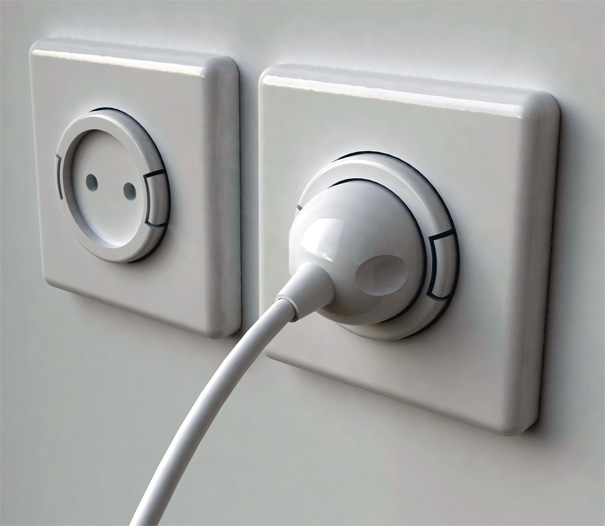
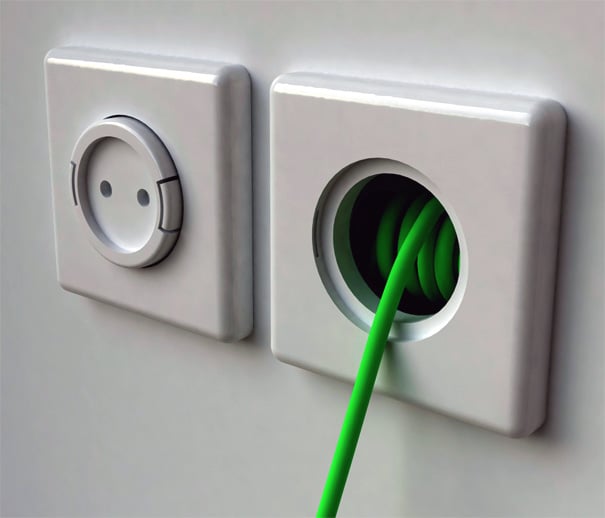
We've all encountered and hated that the powerpoints sockets are always just barely out of reach when we need them the most. The usual drill thereafter is that we either mutter some vulgarities and fetch an extension cord or just grumble and move nearer to the powerpoint. If both aren't possible, then a big sigh of disappointed, probably followed by more cursing. The team at Yanko Design (Japan), however, had a different approach. So instead of being verbally provocative, they provoked their brains. The result, why not build an extension cord into the powerpoint itself?

By making the powerpoint extend-able, there is no more need to go into a frenzy whenever your laptop battery is out of juice. Simply pull out the powerpoint from the wall socket, plug in your laptop AC unit and everyone's happy. Probably the only thing that the person will be unhappy about is to get out of the chair and pull out the powerpoint, but that's not the fault of this invention anyway. Check out the pictures below, taken from the Yanko Design webpage itself.


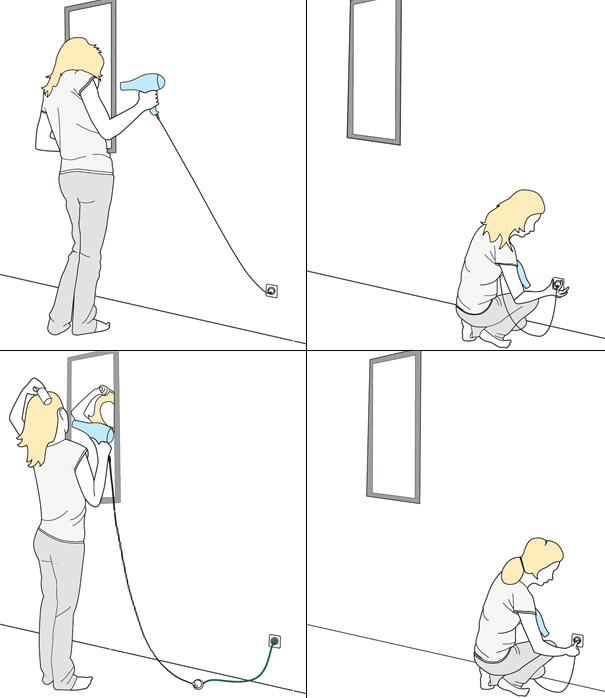
An example of a use of the invention. I've encountered the exact same scenario depicted.

Source: Yanko Design

Minggu, 05 September 2010

Megapost: LG's World's Thinnest TV and Optimus 7 + Some Info About OLED and WP7 (Video)


LG is usually not the first name you think of when you talk about mobile phones and televisions. But that doesn't mean that they are not trying to be ahead of the curve. At the ongoing IFA Consumer's Electronics show in Berlin, they have unveiled some new products and technology, including a prototype Windows Phone 7 and the world's thinnest OLED TV.


World's Thinnest OLED TV (2.9mm Thick)

When you talk about thin televisions now, Samsung's LED TV or Sony's Monolith TV are the few that will pop to mind. Technology in TV sets has always been improving, from Cathode Ray Tube (CRT), to Liquid Crystal Display (LCD), to Plasma. More recently, they have evolved to Light Emitting Diode Backlit (LED) to achieve thinner displays with a high contrast ratio, of which Samsung is the forerunner.
Samsung LED Backlit TV, it's already as thin as it can get

However, there was also another technology quietly sitting in the background. It's called Organic Light Emitting Diodes (OLED). It offers the very good colour reproduction, the best viewing angles and highest contrast ratios among all current technologies. It is also the thinnest and is very flexible, in the literal sense of the word. Check it out in the video below.


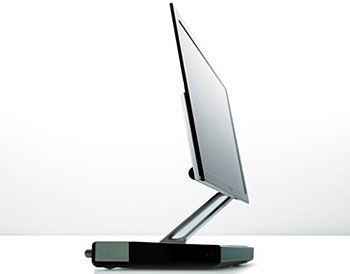
While OLED is already in widespread use in electronics nowadays, the main drawback of it is the high price when it comes to bigger screens. Thus it hasn't been heard of in current television sets, though there were some shown by Sony a couple years back at about 5mm thick but those were only about 11" wide and cost a few thousand (wow!).
Sony's 11" OLED Display at 5mm thickness
Now LG Electronics have revealed their newest TV that uses OLED technology. It is only a prototype, unfortunately. Regardless, it is an amazing TV set to behold. It is the world's thinnest at only 2.9mm thick! You can see it in the video below. The viewing angles are just wonderful, images can be seen the moment you can see the screen. And the colours are deep and rich. No price has been put on it or whether it will go into mass production soon, but it's such a beautiful TV.


LG Optimus 7 - A Windows Phone 7

As mentioned above, LG is not one of the first companies that comes to mind when talking about smartphones. They did try, if you remembered, with the LG Cookie and LG Arena. Ultimately, LG can make a good phone but their user interface and OS just simply do not offer a nice experience. Today, almost every new smartphone has at least a 1Ghz processor, good graphics capabilities and multitouch screen. But what sets them apart are the interfaces and operating systems. There are currently iOS, Andriod, Symbian, Meego, Windows Mobile 6.5, Blackberry OS, WebOS, Bada OS, etc, each with their own design and features.

There is a new, highly anticipated operating system, due to release later this year. That is Windows Phone 7, not to be confused with Windows Mobile OS. It is an entirely new operating system developed by Microsoft and offers a fresh new way to integrate your lifestyle into a phone. The interface is totally unlike what we've seen in iOS or Andriod. Various demo videos have surfaced on YouTube and the OS is currently looking very sleek and professional and smooth running.
Windows Phone 7. It's homescreen features "Live Tiles" which shows you important information on the go.

Many big companies have already signed on with Microsoft to bring this WP7 into the market when it is released. Among them is LG. The Optimus 7 is a prototype Windows Phone 7 that they are showcasing in IFA 2010 right now. Interestingly, Dell is also joining the smartphone industry and came up with some cool looking phones, including a Windows Phone 7 phone. You can read about it in my earlier post here.

LG Optimus 7 Phone
I am not too sure but I think Microsoft do not allow Windows Phone 7 phone makers to skin their devices, unlike Andriod, so there is not way to distinguish one WP7 phone from another. The only way is to provide native apps to their phones to enhance the experience. What LG has done instead is to make their devices work with one another. For example, this LG Optimus 7 allows you to stream photos and videos from the phone to a pair LG TV via DLNA wireless technology. It is not really a new thing but LG has made it more fun by introducing "flicking" gestures. You can view the photos on the phone and if you like what you see and want to share with everyone in the room on a big screen TV, simply flick the photo off the screen to the TV and the TV will display the photo. Pretty neat huh? It can also be done with videos and looks really interesting. Check the two videos below to see it in action.


Technology-wise, LG Electronics has shown that they are not too far behind in the smartphones and television race. They have shown some innovative ideas and will not be overshadowed by the larger companies like Samsung.

Kamis, 26 Agustus 2010

James Cameron Talks About His 3D Camera and Re-Release of Avatar (Video)

Director James Cameron had a guest appearance on G4TV's internet series, Attack of the Show, on which he talked about his 3D camera rig and the re-release of Avatar Special Edition.


I like watching G4TV's Attack of the Show as they usually review gadgets and talk about tech stuff, all put together in a very interesting and humourous presentation. I especially like Kevin, the main host, for his very witty and funny remarks.

This time, AOTS invited director James Cameron to talk about his 3D camera rig, which he developed himself over the last 7 years and the re-release of Avatar Special Edition. As such, he admitted that he personally filmed most of the hand held shots. While this camera is certainly not light, needing 2 men to lift it up, James has had no problems operating it and even shows how comfortable he is with the camera in different positions. All in all, it's a wonderful piece of technology. I find James Cameron to have good humour too, thereby making this episode really funny and one of the best I've seen so far.


Rabu, 18 Agustus 2010

This Razor Blade Can Cut Hair, Straight Down The Middle! (Video)

You've always seen cartoons showing that a blade, be it axe, sword or knife, is so sharp that it can split a strand of hair in half. However, in reality, such a sharp blade doesn't exist... Until now.

GFD, Germany, a leading company in the field of micre-structure diamonds has developed the Diamaze PSD (Plasma Sharpened Diamond). The blade takes advantage of the extreme hardness of diamond to create an outrageously sharp cutting edge. It is so sharp that it is now possible to actually slice hair down the middle.

Watch the video below for proof. The blade actually slices the hair more than 5 times! Just as you thought human hair is already so thin, watch it being sliced multiple times.


Jumat, 13 Agustus 2010

Microsoft Adaptive Display Keyboard - Now You Can Look At Photos While You Type In True Multitasking Style (Video)

This Adaptive Display Keyboard is only a prototype and won the Unified Structured Inventive Thinking (USIT) Student Innovation Contest. It is said to be an extension to the monitor, with a strip of touchscreen above the keys. The thing is that each individual keys are also displays and can be changed.

Why should you care? Because it is just too cool. Check out the videos after the break to see why you would want one connected to your desktop computer.
The touchscreen above the keys basically act as a platform to launch applications. If I'm not wrong, it can also be used to control opened tabs, acting like a taskbar or something. I'm not too sure about that.

What's cool is really the keys, each keys have displays and are adaptive. For example, if you change the language of the keyboard, the keys will update to show the characters of that language. Also it shows you hot keys, like if you were to hold the Windows key, the pre-defined keys will reflect the actions it will do. For example, the M key will show "minimize all", the "P" key will show "projector", etc.

The keyboard is really just a large screen with buttons. Thus, for customising fanatics like me, images can even be added to the keyboard, functioning somewhat like a "keyboard wallpaper". Now that's interesting!

Of course, like every piece of tech, a video demo is always much more entertaining and informative than a paragraph of technical terms. The first video is a general introduction to what the keyboard can do and the second is a more detailed demo, if you're still interested.


Jump to 1:15 if you feel like skipping what the guy has to say. =P


Source: Engadget, YouTube

Kamis, 12 Agustus 2010

Dyson Air Multiplier, A Cool Bladeless Fan (Video)

Every now and then, there'll always be a new take on an existing product. Usually it'll be better and more efficient than the original. But the Dyson Air Multiplier takes the good old electric fan to a stunningly high level.


James Dyson wanted to make a new kind of fan that takes up less energy, more cooling, cleaner and quieter. He did not like the fan blades that "chops" up the air that buffets your face. Thus he came up with this Air Multiplier. It performs the same function as a fan, without the blades. It is called an air multiplier simply because whatever air the fan outputs, the resultant breeze will contain up to 15 times the amount of air in a steady stream. It is easier explained by watching the video below.


Because the fan blows air in a steady stream, the breeze is described as similar to an air-conditioner blowing at you. I'd pretty much like to try it but will have to wait till it's released next year. It however comes at a rather expensive price of a few hundred dollars, though that's the price to pay for a very innovative piece of tech.

Bonus: The following video shows Dyson engineers having fun with the new air multiplier. It also demonstrates how the the air flows when using it. Enjoy.

Minggu, 08 Agustus 2010

A Turntable and A Camcorder = Lots of Interesting Hidden Animation! (Video)

If you like optical illusions, you've probably have heard of the zoetrope before. Zoetropes create the illusion of movement through rapid spinning of the images and viewing through slits, designed to give a strobe like effect and the perception of motion...
This guy decided to modernise the zoetrope, using UV lights and a camcorder, with a lower frame rate. The result is a whole lot of cool futuristic looking animations with a very simple set up.

Sabtu, 07 Agustus 2010

Ultra Cool Light Projection DJ Mixing (Video)

When you see a DJ spinning, chances are there are 2 turntables, a mixer and a whole lot of wires. And maybe an Apple laptop. This DJ apparently has moved on with times, abandoning all that heavy set up for just a glass panel with a projected image of a virtual DJ mixing software. Needless to say, it is touch operated. Is this the future of DJ-ing? Watch the video and see for yourself.

Video after the break.


Senin, 02 Agustus 2010

Use 3D Glasses To View in... 2D? (Video)

With all the rage about 3D displays and glasses these days, it took a while before someone realised that you can use the 3D glasses to share 2 different shows on a screen at the same time.

As 3D TVs are being rolled out to consumers, people with the technical know how can actually modify the accompanying Active Shutter glasses such that a pair of glasses can view only the left eye image and another pair to view only the right eye image. In other words, you can have Ben 10 cartoon and Death Race movie showing on the same screen together. With one pair of glasses, your cuddly 10 y.o. cousin can watch the harmless Ben 10 cartoon, while you have the other pair of glasses and be able to enjoy all the blood and guts and human slaughtering of Death Race at the same time, with only 1 TV. Of course, without glasses on, all you'll see on the screen is a huge mess of colours. There is also no 3D effect as you're only taking in a left/right view.

Video after the break...


But then again, it is one thing to be able to watch 2 shows on the same screen. However, there's still the issue of the audio. How will the audio from each show be transmitted to the correct viewers?

Jumat, 30 Juli 2010

See True 3D Without Glasses!

Ever since the success of Avatar, 3D has been gaining a lot of hype. Everything is now coming out in 3D, from movies to games, from TVs to laptops and even handheld consoles like the Nintendo 3DS, due out next year. No matter what hardware or software is used, the main objective is to provide the user with a feeling of depth. Currently, there are a few methods (Real D, Dolby 3D, Active Shutter, Polarisation, Anaglyph, Autostereoscopy, etc) used to give the viewer the 3D effect. However, they either rely on special viewing glasses or in the case of autostereoscopy, a special screen.
A "Real D" 3D glasses, which are used in Shaw Cinemas here in Singapore.
A "Dolby 3D" glasses, used by GV and Cathay. It is heavier and not as comfortable to use as the Real D one.

But did you know that there is a type of 3D that can be viewed on your monitor or screen right now? That requires no special glasses at all?
And it can offer true 3D images with depth and can be viewed at any angle to the screen. It has been around for more than 10 years too. I am talking about the stereogram, better known as Magic Eye, the company that made it famous.These stereogram images are generated by computer and the hidden 3D image can be viewed using two methods, either keeping your eyes parallel or crossed. The perceived image can be described as popping out of the screen and feels as if you can just reach out to touch it.

An example of a stereogram. This one uses random computer generated dots.

I've attached an image here to try. To see it, first look at the image. Then slowly relax your eyes and let it go out of focus, or you can try looking into a distance beyond the screen. When your eyes are relaxed and not focusing on anything, look at the image below, keeping your eyes out of focus. Tada! The image is popped right out of the screen and you can see true 3D! =D

I've seen these images lots of times in my younger days. But it was only about 6 years ago that I finally managed to get the parallel technique right and can view the 3D images in all the wonderful depth that it was meant to have. Since you have to relax your eyes and let them go out of focus for the parallel method to work, there is no doubt that viewing these images are very soothing and relaxes you. Good for de-stressing. The best thing is that you don't need any special equipment and can view it anywhere, whether on the bus, in school or at home, and on anything, such as phone screen, monitor or paper. Try it for yourself! ^.^

Rabu, 28 Juli 2010

Java Tea Party App for iPhone and iPad


Java Tea Party is an application for both the iPhone and iPad, which allows the two devices to interact with each other. While it may seem interesting, the use for this app is mostly for novelty purposes only, and I bet you'll only play with it a couple of times before the fun wears off. Let's hope that this app is free cause I think it is kind of redundant. Lol.

Watch the trailer above for some laughs.. Their expressions are just so priceless. Hahaha.. I really wonder how some people can act in commercials for such products.

It Is Legal To Jailbreak iPhone

If you have recently heard, the Library of Congress has very recently reviewed issues pertaining to DMCA (Digital Millennium Copyright Act), which makes it an offence to temper with the digital locks set in electronics, such as DVDs and phones.

Every three years, the Library of Congress would review complaints about the system. And one of those issues is about jailbreaking the iPhone. Apparently, after explaining to Apple about the "4 requirements" to be protected by copyright laws, it is found out that Apple's locking down of the phone has nothing to do with copyrighting and protecting sales, but merely as to protect their digital eco-system. Also, jailbreaking attempts have only altered around 50 bytes out of the 8,000,000 bytes of iPhone's copyrighted code, or 1/160,000, which makes it legal.

Their final shot is that when a smartphone has locked out applications that can be operated on it, due to disapproval from the App Store, jailbreaking the iOS such that it allows the usage of that application is considered "fair use" and it is not against the copyright act.

All in all, the Library of Congress has made it legal to jailbreak the iPhone, based on the current jailbreak iterations. Sounds quite far-fetched isn't it? Read more here.

Here's a joke about this issue. It shows Microsoft Bill Gates consoling Apple's Steve Jobs. It's really funny. Hahaha.

Kamis, 22 Juli 2010

BlindType - It's Difficult To Type Wrongly With This Keyboard


This is BlindType, a soft keyboard for iOS and Andriod device.

What's so great about this keyboard is that it is able to correct your inaccurate typings even if none of the letters you type is correct. And with that ability, you can type extremely fast on a touchscreen. The software even allows you to type anywhere on the screen (even at an angle), with an option for the keyboard to adjust to your thumbs' position after every word in both position and scale. There's even a setting where you can type without any keyboard visible on the screen. And you may be thinking, how is that even possible? That's where the video comes in. Watch and be stunned at how accurate this keyboard is. =)

Rabu, 21 Juli 2010

Apple is the Best, in Software Insecurity..

This graph shows that Apple was in second place until 2010, when it jumped to number 1.


Most people will tell you that Apple computers have the least crashes, viruses and errors than Windows PCs. That conclusion is true, many years back. The counter by PC-lovers was that Apple supposedly had a much smaller user base, therefore less people reported errors and less virus authors targeted Macs. Mac-heads then said that it was a baseless argument. Well it turned out that it could have been true after all.

Welcome to present time, when more and more people adopted the Macs for their advertised system stability, ease of use, no viruses, etc etc etc.. And guess what. New research has been done and now look at who is the leader in all the key areas it was supposed to be strong enough for a Windows user to switch to the Mac. So if you've people coming to you and saying that Macs are the best, this is the article you would want to show them. The arguments that they will use against Windows PCs are now defunct. Just in case you don't want to read the actual article, it also says that Apple is the leader and Microsoft stands in third position. Kind of funny that Windows, with a huge user base (~70%), is actually behind Apple with a much much smaller user base (~20%).

Regardless, I would still agree that Apple products have the good looks, both hardware and software. But functionality-wise, there's really not much advantage over Windows, no matter how much better they look.

ArsTechnica Source Link